Reviewed · SEOUL TOURS
South Korea eSIM (3-30 days. Up to 45GB)
This is interesting because it turns the usual SIM-card hassle into a do-it-before-you-go chore. You get a Seoul-based eSIM delivered by email, you scan a QR code to activate it, and you should be connected in minutes. I like that it offers 4G/5G data where available at local rates, and that it’s priced at just $5 per person. One drawback to keep in mind is that after your high-speed allowance ends, data speed switches to 3G, so you might need to pace uploads and big streaming.
If you hate arriving somewhere new and standing in line with your phone half-dead, this kind of setup can be a real relief. Just double-check your phone supports eSIM before you order, because that is where most problems start.
Key Things That Matter Most
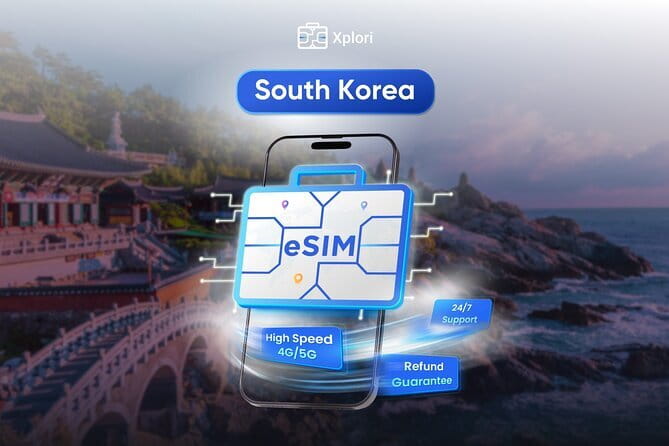
- Email delivery, QR activation, fast setup so you can get connected without airport shopping
- 4G/5G data where available at local rates, useful for maps, messaging, and planning
- Up to 45GB high-speed data, then data drops to 3G instead of going offline
- Coverage claims you should verify, since the description mentions Canadian provinces (worth a quick check)
- Automatic network behavior reported by users, helping it connect without extra fuss
- Remote customer service by email, handy if activation needs a restart
Why This Seoul eSIM Is a Smart Choice for Getting Around
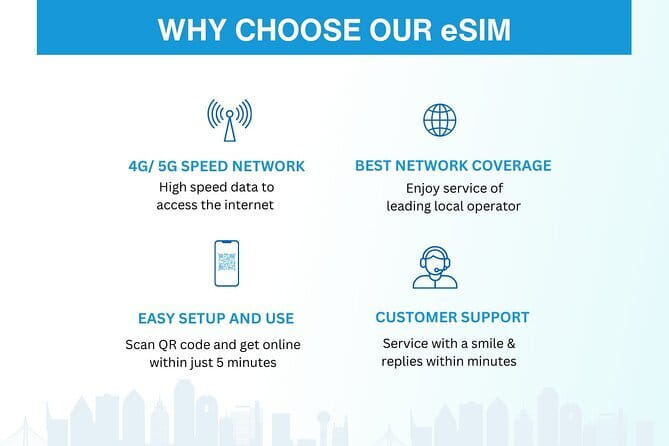
For most trips, your phone is your itinerary, your translation helper, and your “where am I?” detector. If your service is weak or you are stuck waiting to get online, you lose momentum fast. This eSIM is built for the moment you land and want your data working right away.
I like that it’s designed for real travel needs, not just “internet for the sake of internet.” The promise is 4G/5G data (where available) during your stay, and you keep data access for the duration you choose, from 3 to 30 days. That range matters. A short layover trip and a longer Korea visit are totally different in how much data you burn on maps, rideshares, and posting photos.
One more thing I appreciate: the experience is purely digital. No pickup. No meetup. No waiting for someone to hand you a card. You order, you get an email, you activate, and you go.
A few more Seoul days side by side
- Best DMZ Tour Korea from Seoul (Red Suspension Bridge Optional)
★ 5.0 · 41,422 reviews - DMZ Tour: 3rd Tunnel, Option(Suspension Bridge, Boat) from Seoul
★ 5.0 · 21,373 reviews - DMZ tour south Korea from Seoul (NK experience hall, defector)
★ 5.0 · 20,599 reviews
Before You Land: Phone Checks and a Smooth Setup
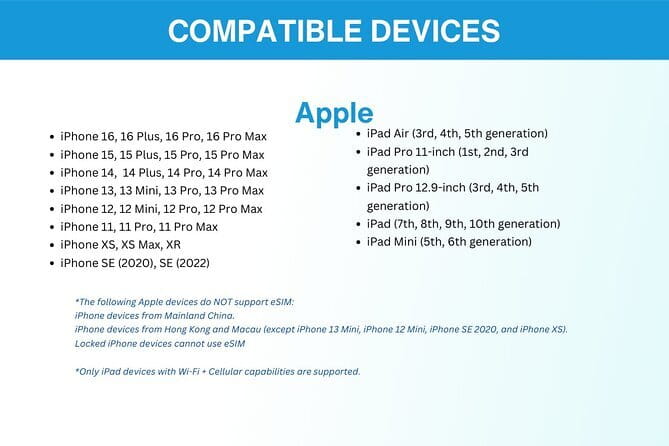
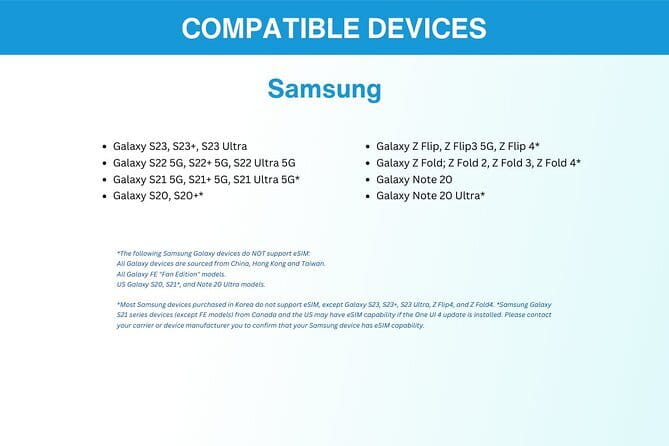
Before you do anything else, make sure your device is eSIM-ready. The information provided lists these as compatible examples: iPhone XS and later, Pixel 3 and later, and Samsung S20, S21, and Fold models. If your phone is older, don’t assume. Look up your model’s eSIM support first, then order with confidence.
Once you order, you receive the eSIM by email. The flow is straightforward:
- Open the email when you are ready
- Scan the QR code to activate the eSIM profile
- Connect within minutes
The reviews reinforce a practical tip that you should follow: after turning things on, you may need to restart your device to fully activate it. That’s a small step, but it can save you the frustration of thinking something is broken when it’s just not finished switching over.
A note on that “Canadian provinces” line
One line in the plan description says the data plan covers all Canadian provinces. That sounds like a copy-paste from another product page, and it might confuse you if you are expecting South Korea-only coverage. Don’t panic. Just treat it as a prompt to verify the coverage details for South Korea before you buy, especially if you are counting on data working everywhere you plan to go.
Activation in Real Life: The Part That Decides if You Relax or Stress
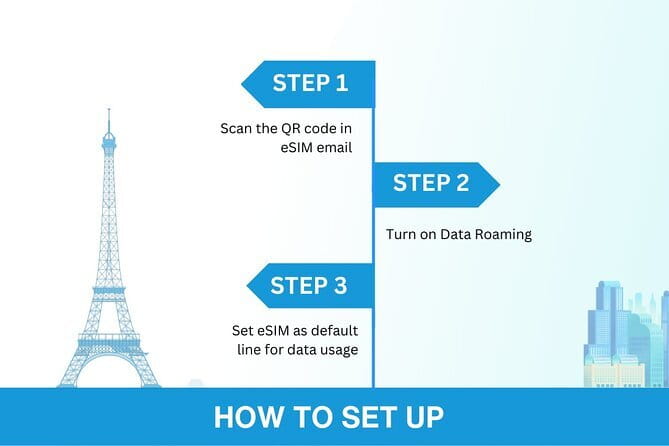
The best travel technology is the kind that just works. This eSIM is meant to do that by design. You scan the QR code, activate the profile, and you should be connected quickly.
Still, I recommend you do the setup a bit before you need it. Even if you plan to activate on the day you arrive, try to leave yourself a buffer window. If activation needs a restart, you want that solved before you start navigating subway stations and streets you have never seen.
If you are the type who likes control, here’s how to think about the process:
- Activation is the setup phase
- Data roaming settings are the on-the-ground switch
- A reboot can finish the handoff
That matches what people reported: once they landed, they needed to turn on their data roaming, and then restarting the device helped them fully activate.
Different day, same base:
- Seoul: The Best DMZ Tour with Optional Suspension Bridge
★ 4.7 · 4,978 reviews - Signature DMZ Tour: Exclusive Defector Talk & Suspension Bridge
★ 5.0 · 4,459 reviews - Thrilling Korean DMZ 3rd Tunnel Tour from Seoul + Red Bridge Rush
★ 5.0 · 3,097 reviews - Seoul: DMZ Tour & Suspension Bridge (Option English/Spanish)
★ 4.9 · 2,628 reviews
Using 4G and 5G in Seoul: What It Gets You

In a city like Seoul, you do a lot of “small internet uses” that add up. You check transit updates. You look up station exits. You use translation when reading signs and menus. You confirm addresses for taxis and rides. You share your location with friends so nobody wanders off to the wrong subway line.
This eSIM is set up for that kind of daily use with 4G/5G where available. The idea of local rates is important too. Airport SIMs can be expensive, and they also come with language friction. With this, you avoid that whole arrival-day maze.
You also get a plan that is flexible in time. Choose 3 to 30 days and match it to your trip length. If you are doing Seoul plus a quick side trip, a shorter option might be enough. If you are staying longer, the bigger range gives you room to breathe without thinking about topping up.
Beyond Seoul: Day Trips and Places Like Jeju
Even though the starting point is Seoul, the data plan is intended for use across your trip in South Korea. One of the most useful details from the experience feedback is that connectivity was reported from Seoul to Jeju island.
That matters because Jeju is where many travelers feel the “data gap” most. It is more likely you rely on navigation apps, maps caching, and real-time searches for things to do. If your data drops unexpectedly, day trips turn into guesswork.
If you plan to do more than just Seoul, make sure you choose your duration based on how often you will use data for transport and planning, not just messaging.
Data Caps, 3G Downgrade, and How to Avoid Hitting the Wall
This plan includes a high-speed allowance, with the option up to 45GB. After that, data speed switches to 3G. The key point is not whether you still have data, it’s how you will use it once speed drops.
Here is a practical way to plan:
- Use high-speed data for mapping, streaming, video calls, and uploads
- Once you are on 3G, shift to low-bandwidth tasks like messaging and checking routes
- Expect that streaming quality and quick searches may feel slower on 3G
The description also claims you will not lose connectivity. That matches the design of a speed downgrade rather than a full cut-off. So you should still be able to function, you just change your expectations.
If you do heavy video calling or you stream for hours every day, you will burn through the high-speed portion faster. If you mainly use maps, translation, and messaging, you can usually stretch it comfortably across days.
Network Behavior and the “Do I Need to Fix Anything?” Test

A good eSIM is like a good transit card. You should not notice it much. The best sign here is that people reported the eSIM connected to the best local network automatically, resulting in strong signal around South Korea, with reliable full bars.
That kind of automatic network selection can matter when you bounce between neighborhoods or when coverage changes as you ride. It means fewer manual steps for you, and less time in settings.
Still, keep one mindset: if something feels off, restart your phone and check that your data roaming is turned on. That fix is simple, and it is specifically supported by the activation experience shared.
Remote Customer Service That You Can Actually Use
This is not a “hand it to us and we’ll help” setup. It is digital, so customer service needs to be reachable. The experience includes remote customer service via email, and that support is a big part of why this can be stress-free.
If you run into trouble, your most likely causes are:
- Your phone is not fully set up for eSIM yet
- Activation needs a restart
- Data roaming settings are not switched on
When you email support, include your order details and a short description of where the process breaks. That makes it easier for them to guide you quickly. It is also why checking phone compatibility before ordering is such a high-value step.
Price and Value: Is $5 Per Person Worth It?
At $5 per person, this is priced like an add-on that could be a no-brainer, assuming it fits your phone and your data needs. The real value comes from what you avoid:
- Airport SIM lines and language friction
- Time spent hunting for a shop after landing
- The risk of buying the wrong plan
- The stress of arriving without your “navigation brain” powered on
The trade-off is that you must get your setup right ahead of time. This is not a drop-in solution if you land and you have no signal at all and no time to fix settings. But if you read the compatibility notes and do the QR activation step, you are likely to spend far less time solving problems than you would with a physical SIM.
Also, because you can choose 3 to 30 days, you can match the plan to your pace. If you are taking a short trip, you do not need to pay for a longer plan you will not use.
Who This eSIM Fits Best
I think this service is best for people who:
- Want reliable data for navigation and planning from the moment they arrive
- Do not want to buy a plastic SIM card or deal with airport setup
- Have an eSIM compatible phone
- Are comfortable doing quick setup steps like scanning a QR code and turning on roaming
It also works well if you are doing day trips, since connectivity was reported beyond just Seoul. If you plan to drive your itinerary using a phone, having data matters more than almost anything else.
Should You Book This Seoul eSIM?
If you have an eSIM compatible phone and you want a low-cost, low-hassle way to stay connected in South Korea, I would book it. The setup is quick, the pricing is budget-friendly, and the emphasis is on keeping you online for maps, calls, and streaming rather than just enabling basic texting.
I would hesitate only if you are not sure about eSIM compatibility, or if you are the type who cannot spare 10 to 15 minutes for setup and a possible restart. Also, because one line mentions Canadian provinces, take 30 seconds to verify coverage for your actual South Korea destinations before you rely on it.
If you like travel tech that removes friction, this is a sensible pick.
Recently reviewed in Seoul
- Korean Folk Village & Suwon Hwaseong Fortress Private Tour★ 5.0 · 3 reviews
- Seoul City Private Tour (Optional layover)★ 5.0 · 3 reviews
- 5D4N Korea Cultural Heritage immersion Private Tour★ 5.0 · 3 reviews
- War Memorial, Jogyesa Temple & Tapgol Park Tour in Seoul★ 4.5 · 3 reviews
- Private Tour : Royal Palace & Traditional Villages wearing Hanbok★ 5.0 · 3 reviews
- Full Day Private Seoul Tour for foodies★ 5.0 · 3 reviews
- Nami Island & Nearby Attractions : Charter Van Tour With Driver★ 4.0 · 3 reviews
- K-Pop Tour★ 3.5 · 3 reviews
Seoul Tours, compared.
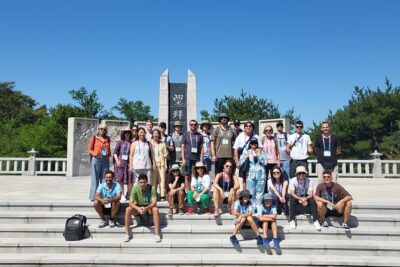
Best DMZ Tour Korea from Seoul (Red Suspension Bridge Optional)
Read our review →
DMZ Tour: 3rd Tunnel, Option(Suspension Bridge, Boat) from Seoul
Read our review →
The Best DMZ Tour with Optional Suspension Bridge
Read our review →

Thrilling Korean DMZ 3rd Tunnel Tour from Seoul + Red Bridge Rush
Read our review →
DMZ Tour & Suspension Bridge (Option English/Spanish)
Read our review →
DMZ Past and Present: Korean Demilitarized Zone Tour from Seoul
Read our review →